Guides / Updated 2026-11-18
Google Maps to Minecraft: Turn Any Real Place Into a World
Use an address from Google Maps to generate a Minecraft world from OpenStreetMap. Try Liberty Island in your browser, then download a Java or Bedrock map.
Search your Google Maps place and build it in Minecraft
Try “Statue of Liberty, New York” or enter your own address. Select an area to build from OpenStreetMap data.
Enter at least 3 characters to search. Place search: Photon · OpenStreetMap contributors
Yes, you can turn a place you found on Google Maps into Minecraft.
Search the same address in the generator above, draw a rectangle around it, and get a real-scale world with its streets, buildings, water and terrain. You can walk it in your browser or download it for Java or Bedrock. The world is built from OpenStreetMap data, not Google imagery.
Generate Liberty Island from a Google Maps search
- Find the landmark. Search for
Statue of Liberty, New Yorkin Google Maps and note that the monument is on Liberty Island. - Select the island in ArnisWeb. Search the same name in the generator and draw a rectangle around Liberty Island and the water immediately around it. You can also load the demo's roughly 1 km² selection.
- Generate the world. Sign in, check the area and credit estimate, and select Java for browser play or Bedrock for a
.mcworlddownload. - Open the result. When generation finishes, choose Play in browser if available, or Download Minecraft world for your edition. A Bedrock result can play in the browser once its Java copy is ready.
Explore the Liberty Island demo in your browser
Open the Statue of Liberty demo on a computer. It loads the existing Liberty Island world without signing in or spending credits. Click inside the world and use W, A, S, D to move. Look for the dock, the island paths and the statue's pedestal.
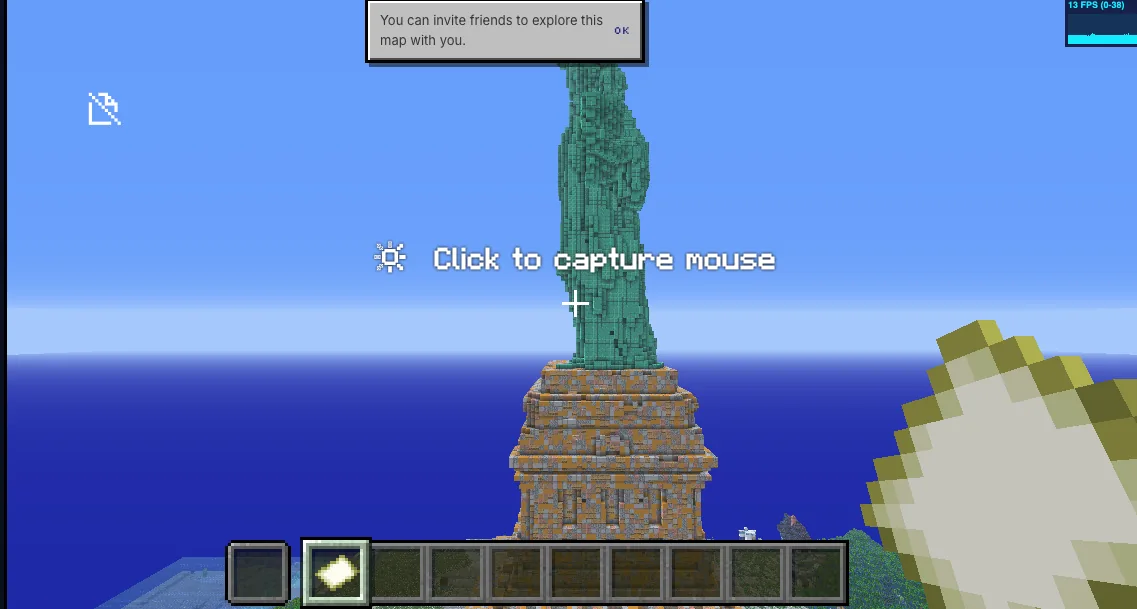
Liberty Island as it appears in the ArnisWeb browser player.
Download a world for Java or Bedrock
Use Download Minecraft world on your result to keep the small world you generated. To explore farther, sign in and download the 20 km² New York harbor map. That world also covers Ellis Island and the southern tip of Manhattan.
- Java Edition: Unzip the download and put the world folder containing
level.datinsidesaves. Open it from Singleplayer. See the Java import guide. - Bedrock Edition: Open the
.mcworldfile with Minecraft on a device that supports importing worlds. See the Bedrock import guide.
Ready-made real cities
If you'd rather start with a famous city than draw your own area, the Minecraft city maps are prepared real places with their landmarks and a guide to what is inside:
- New York: the Statue of Liberty, Ellis Island and the Upper Bay
- Chicago: the Loop, the river, Navy Pier and the lakefront
- Tokyo and London
Is it free?
You can try it for free:
- The Statue of Liberty demo in the browser is free and needs no account.
- New accounts get free map credit, enough for a first small area. Daily check-ins and sharing add more.
- Larger areas use credit by size. See pricing for the current rates.
If generation fails, your credit is returned. Everything runs in the browser, so there's nothing to install. If you prefer a desktop app, the open-source Arnis project is the generator this service is built on.
Use your free credit on a place you know. Your street, school or a favorite landmark makes a great first world.
Build my first world ↑What carries over from the map
| On the map | In your Minecraft world |
|---|---|
| Streets, paths and railways | Roads and tracks in the right places, connected as mapped |
| Buildings | The real footprint of each mapped building, with its height where the data has it |
| Rivers, lakes and coast | Water in the mapped shape |
| Parks, fields and woods | Grass, farmland and trees by land use |
| Hills and valleys | Real elevation in terrain modes |
| Photos, facades and Street View | Not copied: walls and roofs use generic Minecraft blocks |
| Interiors | Not included: buildings are shells you can furnish |
Why it may not match Google Maps
Google Maps and OpenStreetMap are different maps. A building you see on Google Maps may be missing here if no one has added it to OpenStreetMap yet. A building with no recorded height gets a default one. City centers are usually mapped in detail, while small villages can be sparse.
Before you generate, zoom in on the generator map: what you see there is what will be built. Busy, well-mapped neighborhoods give the best results. Read OpenStreetMap to Minecraft for how each map feature becomes blocks, or the city generator guide for choosing a good urban area.
Missing your house? Anyone can add it on OpenStreetMap, and later generations will include it.
Want a Google Maps view of your Minecraft world?
Some searches mean the opposite: a zoomable, Google Maps-style map of a world you already play. That needs a world-mapping tool rather than this generator:
- BlueMap and Dynmap show a live web map of a server in any browser.
- uNmINeD renders a single-player world as a map image on your computer.
These tools also work on worlds generated here, so you can put your real-city server on a web map.
Found your place on Google Maps? Search the same address, draw the area, and walk it in Minecraft today.
Open the generator ↑Map data © OpenStreetMap contributors.