- Honeycomb Block
- Yellow Terracotta
- Red Sand
- Stripped Acacia Wood
- Orange Terracotta
- Red Terracotta
- Stripped Mangrove Wood
- Crimson Stem
Minecraft Gradient Generator
Pick two blocks or colors, preview the gradient on a wall, and get the exact materials you need to build it.
Minecraft Block Gradient Generator
Minecraft Java 26.3Start Block
End Block
Settings
Preset
Full palette
Block List (12)
Build preview
16 × 12 · Wall
Select a block in the preview or palette to exclude it.
Preview settings
Materials192 blocks
- Crimson Stem48
- Honeycomb Block48
- Netherrack16
- Stripped Mangrove Log16
- Yellow Poplar Leaves16
- Acacia Planks13
- Pumpkin12
- Creaking Heart11
- Magma Block5
- Orange Stained Glass4
- Smooth Red Sandstone3
How to make a block gradient in Minecraft
Choose a start and an end
Pick your Minecraft Java version. Search by name or block ID, choose a texture face where available, or switch either endpoint to Color and enter a HEX value. Swap the endpoints to reverse the transition.
Refine the palette
Set the number of blocks and use preset filters to narrow the materials. Inspect any block in the palette or preview to exclude it. Refresh Palette to see a different sequence with the same endpoints.
Preview, copy, and share
Choose Wall or Floor, set the dimensions, and set the gradient direction. Adjust the length and randomness, then open Materials for quantities. Copy the list, share the result, or download a blueprint to follow while you build.
Popular Gradients
Explore Minecraft block gradient palettes for walls, windows, and pixel art. Each example loads its exact blocks in the generator.
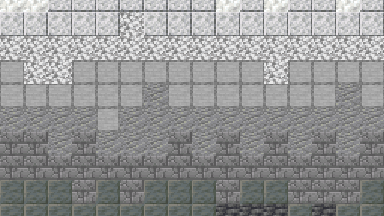
Stone shades
Start a castle wall with blackstone and finish with pale calcite. Use the middle grays around windows and stairs to soften the transition.
Use this gradient- Blackstone
- Cracked Deepslate Bricks
- Polished Basalt
- Tuff
- Andesite
- Smooth Stone
- Polished Diorite
- Calcite
Gold to crimson
Blend honey gold, red sand, and terracotta into crimson wood for an autumn wall. Give the red sand a solid base when building this palette.
Use this gradient- Honeycomb Block
- Yellow Terracotta
- Red Sand
- Stripped Acacia Wood
- Orange Terracotta
- Red Terracotta
- Stripped Mangrove Wood
- Crimson Stem
Purple to pink
Use concrete, wool, and concrete powder for a saturated fade in pixel art or a sign wall. Keep the powder away from water if you want its soft texture.
Use this gradient- Purple Concrete
- Purple Wool
- Purple Concrete Powder
- Magenta Concrete
- Magenta Wool
- Magenta Concrete Powder
- Pink Concrete
- Pink Wool
Stained glass
Layer blue, cyan, and light blue in a window or skylight. Try the light and dark backgrounds to see how the panes read against different walls.
Use this gradient- Blue Stained Glass
- Cyan Stained Glass
- Light Blue Stained Glass
Red sandstone to sandstone
Move from red sandstone at ground level to pale sandstone at the roofline. The cut and smooth blocks add texture without leaving the sandstone family.
Use this gradient- Red Sandstone
- Smooth Red Sandstone
- Cut Red Sandstone
- Cut Sandstone
- Smooth Sandstone
- Sandstone
What is a Minecraft block gradient?
A block gradient is an ordered set of Minecraft materials that fades from one color or texture to another. Use it to shade the base of a tower, blend two layers of a cliff, or make a window shift from dark blue to light blue. The generator turns your two endpoints into a palette, a placement preview, and a list of blocks to gather.
Choosing the right gradient for your build
Shade a wall or tower
Start with a dark block at the base and a lighter block at the top. With a bottom to top direction, deepslate and calcite make a clear masonry fade. Set the gradient length to the height of the transition, then add a little randomness where rows meet. Preview a single wall face at its actual width and height to get a useful material count.
Plan a stained glass window
Load the stained glass example to see blue, cyan, and light blue in a horizontal transition. Use Stained glass only when you want the intermediate blocks to stay in that material family. Switch between the light and dark preview backgrounds to see how the same gradient reads against different scenery. A glass wall looks different with sky behind it than with stone behind it.
Build with materials you can gather in Survival
Start with a block you already have and use Survival obtainable or Bulk building to narrow the suggestions. Try Renewable for a build you plan to extend. If a suggested block is hard to source, exclude it or try another palette. Use the material counts to decide how many stacks to bring before you start placing blocks.
Match the blocks to your Java version
Choose 1.21.11 in the version menu for a build on that Java release. The available blocks and textures change when you select a different release. If the new version lacks one of your selected blocks, the tool keeps its color and looks for an available match. Recheck the material list after switching versions.
Minecraft gradient generator FAQ
Can I use a HEX color and a Minecraft block in the same gradient?
Yes. Each endpoint can be a block or a color. Switch the endpoint to Color, enter a six digit HEX value such as #527e96, and the generator finds a nearby match among the eligible blocks.
What is the difference between palette steps and gradient length?
Palette steps set how many positions to fill with materials between your endpoints. Gradient length controls how many blocks the transition spans along the chosen direction in the wall or floor preview.
What does randomness change in the wall preview?
Set randomness to zero for clean bands. Raise it to mix nearby materials across the transition so the edges of those bands look less regular.
How do I remove a block from the palette?
Select the block in the Block List or preview and choose Exclude block. The generator recalculates the result. Open the Excluded blocks list in settings to restore the material.
How do I make a gradient with only stained glass?
Pick two stained glass blocks and enable Stained glass only. Try the blue, cyan, and light blue example to see the effect, then change the endpoints or direction to suit your window.
Does the Minecraft gradient generator support 1.21?
Yes. The version menu includes Minecraft Java Edition 1.21.11. Select that release before choosing your materials to use its block catalog and textures.
Can I share or save a gradient for later?
Share copies a link that restores the palette settings and placement preview. Save gradient keeps a personal copy on this device, and signing in lets you save a copy to your account.
Which files can I export for a Minecraft build?
Open Materials to download a PNG blueprint or a CSV of the block counts. When the palette and layout are compatible, you can also export a Litematica .litematic, a WorldEdit .schem, or a Bedrock .mcstructure file.