Build the floor ring first
Lay one layer on the ground and check it from above before you raise walls. Fixing a wrong block is easiest at this point.

Free Minecraft building tool
Enter a diameter from 1 to 256 blocks to get a circle blueprint and an exact block count. Follow the grid in Survival, or preview your build in 3D and export it for Java or Bedrock.
The Java world is a creative superflat world (Java 1.21.4 or newer) with the build in front of spawn. Unzip it into .minecraft/saves.
Use these examples to choose a diameter for your build. Enter that size in the generator to see the blueprint and calculate materials for your wall height.
| Blueprint | Diameter | Good for | Outline blocks | Filled blocks |
|---|---|---|---|---|
| 5 | Pillars, wells and small decorations | 16 | 21 | |
| 7 | Lookout towers and silo bases | 24 | 37 | |
| 9 | Watchtowers with a ladder in the middle | 32 | 69 | |
| 11 | Wizard towers and spiral staircases | 40 | 97 | |
| 15 | Castle towers and grain silos | 56 | 177 | |
| 21 | Fountains, courtyards and small domes | 80 | 349 | |
| 31 | Castle keeps, arenas and mob farms | 120 | 749 | |
| 41 | Colosseums and large farms | 160 | 1,313 | |
| 64 | Stadiums, moats and city walls | 252 | 3,228 |
This stone brick tower is 15 blocks across and 5 blocks tall. The downloadable world contains the hollow walls with an open top. Use the filled plan if you want to add a floor.
Use this for a decorative ring.
Repeat this layer for the tower walls.
Use this as a single layer for the floor.
The walls use 280 stone bricks before you cut the doorway. An optional floor adds 177 blocks.
Circle for towers and floors, oval for stretched rooms, sphere for planets and bubbles, dome for roofs.
Type the diameter or drag the slider. Odd sizes have a single centre block; even sizes have a 2×2 centre.
Hollow makes a wall you can set from 1 to 32 blocks thick. Filled makes a solid disc or ball.
Follow the blueprint and tick blocks off as you place them, or download a schematic or world file.
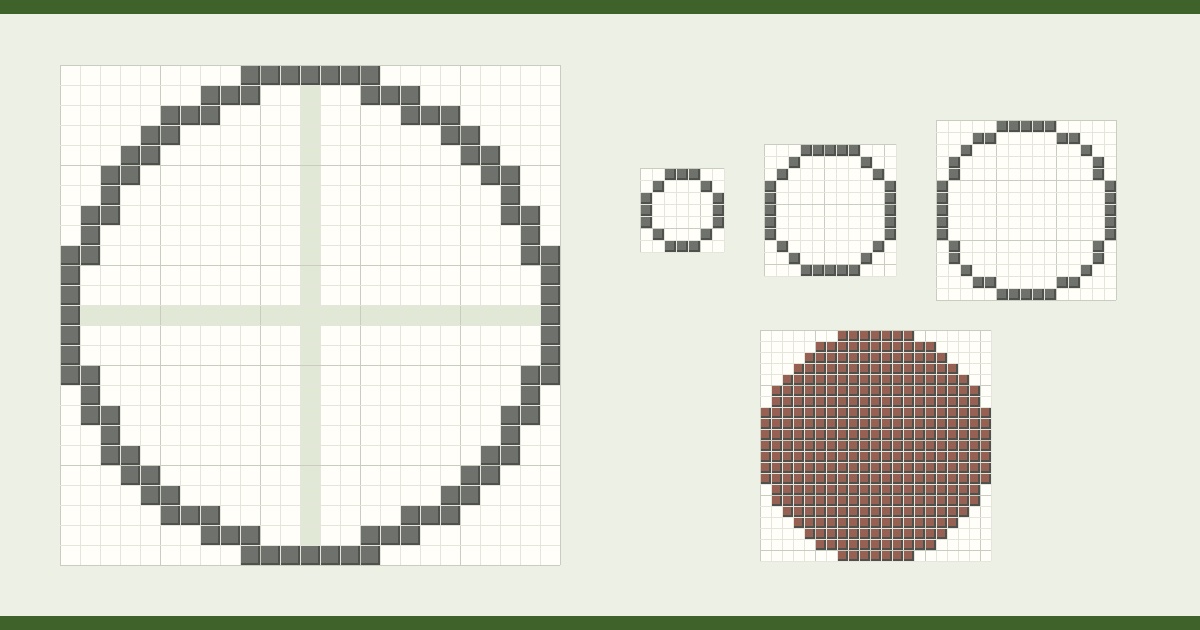
A Minecraft circle generator, also called a Minecraft circle maker or circle creator, works out which blocks to place so Minecraft circles look as smooth as the square grid allows. Instead of guessing where each step goes, you get a blueprint to copy row by row and the exact number of blocks to bring.
Builders use an MC circle generator for towers, domes, arenas, fountains, moats and round farms. This one also covers ovals, spheres and domes, shows every layer in 3D and exports the build, so the same blueprint works whether you place blocks by hand or paste them with a mod.
Every Minecraft circle is a pixel circle: a round shape drawn on a square grid. That makes this tool a pixel circle generator too. Set the diameter, choose a thin, thick or filled outline and you get the pixelated circle as a grid you can follow square by square.
Download the PNG blueprint to use the same pixel circle maker output for pixel art, sprites, cross-stitch, perler beads or graph-paper drawings. The grid, coordinates and centre lines make it easy to copy at any scale.
Minecraft has no round blocks, so every circle is made of short straight runs that step inward. No circle is mathematically perfect, but the generator places every block whose centre falls inside the true circle, which gives the most even steps the grid allows.
This Minecraft circle guide works for any size. To make a circle in Minecraft, mark the centre first. Count half the diameter out in each of the four directions and place a block at each end: these are the flat sides of the circle. Then build one quarter from the blueprint, row by row, and mirror it to the other three quarters.
The block count updates as you change the size, so the generator doubles as a Minecraft circle calculator. A one-block wall 15 blocks across takes 56 blocks (40 with the thin outline) and a filled 15-block disc takes 177. Taller walls multiply the outline by the number of layers.
Counts are also shown as stacks of 64 and as shulker boxes, so you know what to bring before you start. Spheres and domes add a count for every layer.
An odd diameter, such as 15, has one centre block, which makes it easy to line up doors, a centre pillar or a beacon. An even diameter, such as 16, has a 2×2 centre: use it when you want a two-block doorway or a staircase down the middle.
Both look equally round. The centre lines in the blueprint show which blocks form the middle.
Lay one layer on the ground and check it from above before you raise walls. Fixing a wrong block is easiest at this point.
Hover a row in the blueprint to see its run lengths, such as 3 · 3. Placing runs is faster than counting single blocks.
Above about 40 blocks a one-block wall looks thin from inside. Two or three blocks also leave room for windows.
Click blocks in the blueprint as you build. Progress is saved in this browser for each shape and layer.
Every shape can be downloaded for the tool you already use.
Put the file in .minecraft/schematics, open the Litematica menu with M and load it as a hologram to build over.
Put the file in the WorldEdit schematics folder, then run //schem load <name> and //paste. The shape is centred on you.
Load it with a structure block, or add it to a behaviour pack and use /structure load. Shapes wider than 64 blocks come as tiles.
Unzip into .minecraft/saves and open it: a creative superflat world with your build in front of spawn.
A printable image with a grid, coordinates and centre lines. Spheres and domes also come as one sheet with every layer.
Yes. The Minecraft circle generator is free, needs no account and runs in your browser. Blueprints, block counts, the 3D preview and every download cost nothing.
Enter the diameter in the circle generator, mark the centre in game, then copy the blueprint row by row. Building one quarter and mirroring it keeps the circle symmetrical. Blocks are square, so no circle is perfect, but this gives the closest shape the grid allows.
It depends on the size and style. A one-block wall of 15 blocks across uses 56 blocks, or 40 with the thin outline; a filled 15-block disc uses 177. The generator calculates any size from 1 to 256 and shows stacks and shulker boxes.
Yes. The Minecraft circle chart shows every circle from 3 to 64 blocks as a diagram and lists block counts up to 128. It prints on a few pages for building away from the screen.
Yes. The blueprint is a pixel circle on a grid, so it works for pixel art, sprites and bead patterns as well as Minecraft. Download it as a PNG to print or trace.
Towers of 7 to 11 blocks across fit a staircase and look slim. Castle towers are usually 13 to 17 blocks; keeps and silos 21 or more. Odd diameters make a centre ladder or pillar easy to place.
A thin circle joins blocks at the corners only, so it uses fewer blocks and looks lighter. A thick circle, the default, joins every block along an edge for a bolder line. Built from full blocks, both hold water and keep mobs out: neither can pass between two blocks that touch at a corner. Fences, glass panes, walls and iron bars only connect side to side, so build those on the thick outline. Wall thickness adds more rings inside.
Yes. Pick Sphere or Dome, then step through the layers with the layer slider or view the whole shape in 3D. The dome height can be lowered for a flatter roof.
No. You can copy the blueprint by hand in any edition, including survival. Mods only save time: Litematica shows the circle as a hologram to build over, and WorldEdit pastes it instantly.
The blueprints work in every edition. Downloads cover both: .litematic and .schem files and a ready-made world for Java, and .mcstructure files for Bedrock structure blocks.

Bigger than one tower?
ArnisWeb rebuilds real streets, buildings and terrain from map data. Pick any place on Earth and download it as a Java or Bedrock world.
Guides